Development Guides
Compile
Build your helm chart
cd my-helm-chart
helm package .
Push to OCI registry
Push your helm chart to OCI registry.
helm registry login kosmos-registry.kosmos.athea --username atheaadmin --password <pwd>
helm push my-helm-chart-0.0.0.zip oci://kosmos-registry.kosmos.athea/athea/kosmos-charts/
Rancher
You can see your helm chart in Rancher UI (Apps) or using Kosmos Studio (Apps).
Configure Helm registry
Follow this step to display your helm registry in Rancher:
Rancher:
Apps->Repositories. Add new repository.- name:
kosmos-charts - description :
Kosmos Charts - Target:
OCI Repository - OCI Repository Host URL :
oci://zot-registry.kosmos-dev-restricted.svc.cluster.local:5000/athea/kosmos-charts/ - Authentication : zot-pull-secret (HTTP Basic Auth: kosmospull)
- Check "Insecure Plain Http" box
or by kubernetes resource:
kubectl apply -f - <<'EOF'
apiVersion: catalog.cattle.io/v1
kind: ClusterRepo
metadata:
  annotations:
    field.cattle.io/description: Kosmos Charts
  name: zot
spec:
  clientSecret:
    name: zot-pull-secret
    namespace: kosmos-dev-restricted
  insecurePlainHttp: true
  url: oci://zot-registry.kosmos-dev-restricted.svc.cluster.local:5000/athea/kosmos-charts/
EOF
Use questions.yaml
Here is an example of how to use advanced features of the questions.yaml
  - variable: securityContext
    type: map[
    label: "Security Context using a map"
    description: >
      Security Context as an example of type map, this allows adding a map where the value is a multiline string,
      you can also import content from files. The key will be the file name, and value will be the content
    default:
      securityContext: |
        runAsUser: 1000
        runAsGroup: 1000
        runAsNonRoot: true
        allowPrivilegeEscalation: false
        seccompProfile:
          type: RuntimeDefault
        capabilities:
          drop:
            - ALL
  - variable: sso.enabled
    default: true
    required: true # force user to enter this value
    group: "SSO" # this includes the current variable in a separate menu, by default it all goes to "Questions"
    type: boolean
    label: "Enable SSO"
    description: "Enable SSO for your application"
    show_subquestion_if: true # will only show the settings in subquestions if variable sso.enabled is set to true
    subquestions:
    - variable: sso.groups
      type: array[ # type list or array
      label: "SSO Groups"
      group: "SSO"
      description: "List of groups for SSO Access"
      default: ["user", "admin"]

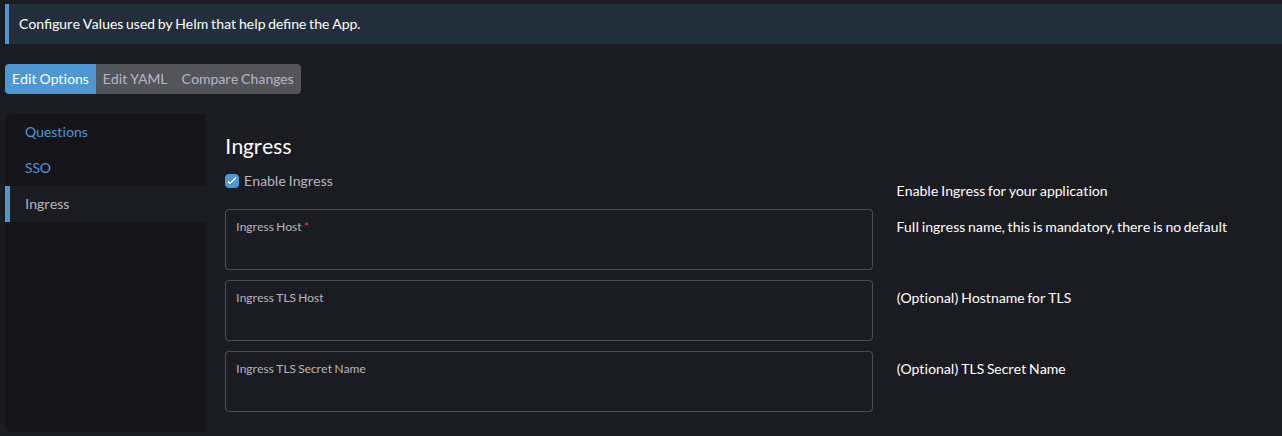
  - variable: ingress.enabled
    default: true
    group: "Ingress"
    type: boolean
    label: "Enable Ingress"
    description: "Enable Ingress for your application"

  - variable: ingress.rules.0.host
    default: ""
    required: true
    # default type is string
    label: "Ingress Host"
    description: "Full ingress name, this is mandatory, there is no default"
    show_if: ingress.enabled=true # this is for selective conditions to show variable instead of global condition like subquestions
    group: "Ingress"

  - variable: ingress.tls.0.hosts.0
    default: ""
    required: false
    # default type is string
    label: "Ingress TLS Host"
    description: "(Optional) Hostname for TLS"
    show_if: ingress.enabled=true # this is for selective conditions to show variable instead of global condition like subquestions
    group: "Ingress"

  - variable: ingress.tls.0.secretName
    default: ""
    required: false
    # default type is string
    label: "Ingress TLS Secret Name"
    description: "(Optional) TLS Secret Name"
    show_if: ingress.enabled=true # this is for selective conditions to show variable instead of global condition like subquestions
    group: "Ingress"
Here is what it should look like: