Overview
Basic pipelines are used in the following cases:
- to process unstructured data like images, audios, videos, documents, which are typically not partitionable ;
- to build custom functions with low level dependencies (linux libraries or packages, cuda, LLM components, ...) ;
- if analytics pipelines do not fit your needs.
In this mode, each Task of a Pipeline is instanciated as one or several Kubernetes Pod (depending on parallelism). The Task specifies the main container that runs the computation or algorithm, and its working parameters. The Flow is launched by the KFlow engine.
Two runtimes are provided to ease the integration of algorithms whose external interfaces are written in Python or Java.
Pipeline configuration
To use the basic mode, your Pipeline should contain the following :
runtime: flow
mode: batch # (1)!
parallelism: 1 # (2)!
globalConfig:
  store:
    addr: 192.168.100.237:32657 # (9)!
    user: minioadmin
    password: password
    autoDownload: false # (8)!
  sideStream: # (10)!
    addr: 192.168.100.237:32658
    enabled: true
    errorTopics: "topic1,topic2"
  metrics:
    enabled: true # (11)!
    port: 9002 # (3)!
dag:
    - id: read-source # (5)!
      type: fs-source # (4)!
      out: [...] # (6)!
      globalConfig: # (12)!
        store:
          autoDownload: true
      ...
    - ... # (7)!
- Stream processing is the default mode of execution if this attribute is absent. If you want to run the pipeline in batch mode, you should specify
mode: batch - will run all compatible Tasks with the provided parallelism. For type raw this will result to have
< parallelism value > * pods - Port of the Prometheus server.
- The list of available function types is described here.
- Choose a unique id for each Task in the DAG.
- The
outfield is a list of ids of the next Tasks in the DAG. - Add more Tasks to the DAG as needed.
- See Autodownload documentation for more information.
- Address, user, password of the default minio S3 server. If this is not set here or in the
globalConfigattribute of each task, the value configured for KFlow will be used. - Default configuration for side streams. It can be overridden in the
globalConfigattribute of each Task attribute. A nats server is expected for side streams. - If
metricsis enabled, a Prometheus exporter is started (see Monitoring). - Every setting set here has priority over the global settings.
Automatic download
When automatic download is enabled (by setting autoDownload: true in the globalConfig.store section of the dag task), the runtime will automatically download the files referenced in the input stream and provide the local path to the file in the Context object.
For this to work, the input stream must contain two fields :
bucket: The name of the bucket where the file is stored.key: The key of the file in the bucket.
These fields are typically those returned by the fs-source function type.
Because of these expectations, the autoDownload should only be set locally to the dag task that needs it.
parallelism: 1

dag:
  - id: list-s3-bucket
    type: fs-source
    format: list
    addr: minio.kosmos.svc.cluster.local:9000
    topics: s3a://docs
    user: minioadmin
    password: minioadmin
    meta:
      checkpoint: true
    schema: |
      {
        "type": "record",
        "name": "s3list",
        "namespace": "tech.athea.kosmos",
        "fields" : [
          {"name": "url", "type": "string"},
          {"name": "lastModifiedUnixMilli", "type": "long"},
          {"name": "bucket", "type": "string"},
          {"name": "key", "type": "string"}
        ]
      }
    out:
      - demo
  - id: demo
    type: raw
    image: process-function:dev
    imagePullPolicy: Always
    globalConfig:
      store:
        autoDownload: true # This is where you set autoDownload to true, to download locally files found by the list-s3-bucket task
    schema: |
      {
        "type": "record",
        "name": "necessaryButNotUsed",
        "namespace": "alsoNecessaryButNotUsed",
        "fields" : [
            {"name": "a", "type": "string"},
            {"name": "b", "type": "string"}
        ]
      }
    out:
      - s3
  - id: s3
    type: s3-sink
    image: basicjavaruntime:latest
    imagePullPolicy: Always
    addr: minio.kosmos.svc.cluster.local:9000
    user: minioadmin
    password: minioadmin
    # bucket to write into
    topics:  s3a://testjson
    schema: |
      {
        "type": "record",
        "name": "necessaryButNotUsed",
        "namespace": "alsoNecessaryButNotUsed",
        "fields" : [
            {"name": "a", "type": "string"},
            {"name": "b", "type": "string"}
        ]
      }
Automatic download configuration
Python Runtime specific
By default, the Python runtime will download the files in subdirectories of a /tmp/{hostname} directory of the container. You may ovveride this directory by setting the download.directory attribute in the meta section of the dag task.
dag:
  - id: demo
    type: raw
    image: process-function:dev
    imagePullPolicy: Always
    globalConfig:
      store:
        autoDownload: true
    meta:
      download:
        directory: /tmp/mydir
    schema: |
      {
        "type": "record",
        "name": "necessaryButNotUsed",
        "namespace": "alsoNecessaryButNotUsed",
        "fields" : [
            {"name": "a", "type": "string"},
            {"name": "b", "type": "string"}
        ]
      }
    out:
      - s3
Please note that the directory must be a subdirectory of /tmp/ for security reasons. Having the directory as a static path allows for easier configuration of communication between containers in the same pod (see sidecars configuration).
If an error occurs during the download, a trappable exception will be raised in the Python code. The exception is handled by the runtime like other trappable exceptions (see Error handling).
If the environment variable KFLOW_SKIP_DOWNLOAD_ERROR is set to true, the runtime will not raise an exception if the download fails. Instead, the downloader_local_object_url field of Context object will contain the none value.
If the environment variable KFLOW_DL_UP_PROGRESS is set to a number between 1 and 100, then the runtime will print the download progress in the logs (INFO level). The value represents a percentage and is the minimal percentage variation of the download progress to trigger a log.
Error handling
There are two kinds of error which should be considered :
- recoverable error which may be intercepted by a
try/exceptblock in the function processing code or by the runtime ; - non recoverable errors, typically linked to a container crash.
The following diagram summarizes the path of error processing during message handling and the way Nats, the runtime and python code interact.
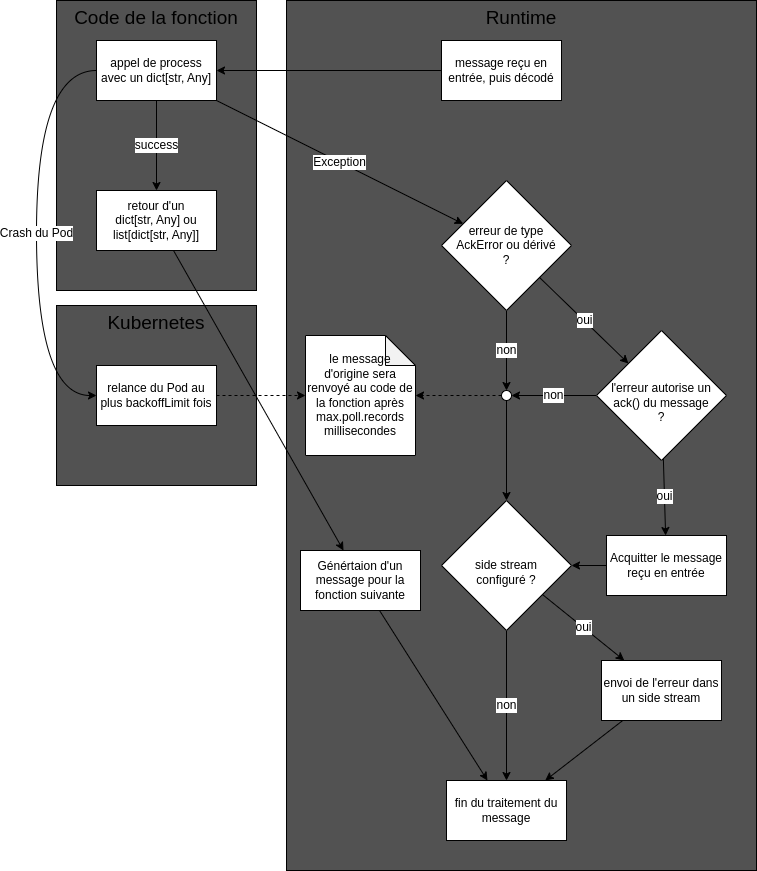
- The recoverable errors are caught by the runtime and the message is acknowledged if the error is of type
AckErrorand authorizes message acknowledgement. The message is then not processed again. If a side stream has been configured, the error is sent to this stream. - The non recoverable errors lead to the Pod being restarted. As the message has not been acknowledged, it is sent again by the Nats broker and processed again. The number of retries is limited by the Kubernetes Job configuration. Note that for this to work properly, the
groupIdfield of the function must be set to a unique value for each function in the pipeline.
Error SideStream content
If you configure your task to have a SideStream in your pipeline then any Python/Java exception thrown by the process function will be caught by the runtime and a record giving information about this error will be sent to this SideStream.
This SideStream record contains the following columns :
error: The exception message.payload: The record which caused the exception as a String which is either the original Avro payload or a decoded payload (see below).podName: The pod in which the exception happened.flowId: The flow unique Id to which the pod belong.functionId: The function ID given in the topology.timestamp: the timestamp as a ISO8601 date, which can be automatically interpreted as a timestamp field by ElasticSearch.
The SideStream by himself does nothing with this data, it only posts it to the configured Nats subject. You then need to do something with it.
Error SideStream configuration
The globalConfig field, either at the topology level or function level needs to contain this data :
globalConfig:
  sideStream:
    enabled: true # if false, then sideStream will be disabled
    addr: "nats://natsjs.default.svc:4222" # address of the Nats server, prefixed with "nats://"
    errorTopics: kflow-error.error # subject used for the error. The part before the mandatory dot is also the stream name
If the environment variable KFLOW_CREATE_SIDESTREAM is set to a value different from false (by default it is false), then the Nats stream which contains the error records will be created automatically if it does not exist. In the previous example its name will be kflow-error.
Error SideStream behavior
The normal behavior of SideStream is as follows :
- do not acknowledge the incoming message. If the error is due to a transcient event, the message will be processed again. If the error is due to a misconfiguration, a bug, or another permanent event, then the default behavior may be unappropriate (see below)
- send in
payloadthe original message in its Avro encoded form. Again, this may be unappropriate if the schema is not known by the stream handler
The normal behavior may be overriden if the error is a class derived from AckException. The class AckException defines two methods :
class AckException(Exception):
    def should_ack(self)-> bool:
        return True

    def payload_as_json(self)-> bool:
        return True
Thus, by default, an AckException derived class will acknowledge any incoming message upon exception and will send in payload the original message in its Json encoded form. You may override this in your own code :
from kfbasicpy.runtime.basic import AckException

class MyException(AckException):
    def __init__(self, ack_behavior: bool)
        self._ack.behavior = ack_behavior

    def should_ack(self)-> bool:
        return self._ack.behavior

class MyProcessFunction(ProcessFunction):

    def process(self, event_dict: dict[str, Any], ctx: Context) -> dict[str, Any] | list[dict[str, Any]]:
        try:
            ... # actual processing
        except NetworkException as e:
            # an hypothetical NetworkException is supposed to be transient
            # hence it makes sense to replay the message
            raise MyException(false)
        except AlgorithmException as e:
            # an hypothetical Algorithm is supposed to be permanent
            # hence it does not make sense to reply the message
            raise MyException(true)
The following python code will extract from the error field of the side-stream message some information about the error class, and message if it exists :
error = msg.get("error", "\n\n").split("\n")[-2]
clazz = error.split(":")[0]
reason = ":".join(error.split(":")[1:]).trim()
Generic Sidestream
In addition to the main output (the out field) you can define a Sideouts field which respresent the secondary output of your Process Function.
These outputs do not have the same delivery garantee as the main one, sending data to a sideout is done in async mode at the same moment it is requested instead of done after a successfull call to the process function main method, which means that an input event that is replayed will potentially create the sideout messages again. The se sideout are bets sued to send information whose deduplication is not as important such as status notification.
Definition in the topology
dag:
[...]
  - id: forward
    type: raw
    image: kast-registry.kast.wip:5000/custom-image-with-sideout:latest
    imagePullPolicy: Always
    sideOuts:
      - id: mysideout
        schema: |
          {
            "type": "record",
            "name": "demoside",
            "namespace": "tech.athea.kosmos",
            "fields" : [
              {"name": "err", "type": "string"},
              {"name": "id", "type": "string"}
            ]
          }
        out:
          - print-sideout
    schema: |
      {
        "type": "record",
        "name": "demo",
        "namespace": "tech.athea.kosmos",
        "fields" : [
            {"name": "msg", "type": "string"},
            {"name": "id", "type": "string"}
        ]
      }
    out:
      - print-main
  - id: print-main
[...]
  - id: print-sideout
[...]
Using Sidestream in the code
[...]
    @Override
    public GenericData.Record[] invoke(final GenericData.Record record, final Context ctx) throws Exception {

        String inputMsg = (String)record.get("msg");
        String inputId = (String)record.get("id");

        if (inputMsg.isEmpty()) {
            GenericData.Record sideRec = ctx.getNewRecord("mysideout");
            sideRec.put("err", "the message was empty");
            sideRec.put("id", inputId);
            ctx.toSideStream("mysideout", sideRec);
        }

        return new GenericData.Record[] { record };
    }
[...]
Acknowledgement management
It is the responsability of Nats to present messages to be processed to the runtime. As we have seen in Error Handling, an incoming message should be eventually acknowledged, either by the runtime or by the function code. If the message is not acknowledged, it will be resent by Nats to the runtime.
-
max.poll.interval.msis set in themetasection of a function. It is the maximum time in milliseconds that the Nats consumer will wait for a message to be acknowledged. If the message is not acknowledged in this time, it will be resent (offered again in the list of messages to be polled) by Nats. The default value is 120000 (2 minutes). If this value is set too high and the failure rate is high and fast, much time will be lost in waiting for messages to be resent. If this value is set too low, the message risks beeing processed multiple times if the function execution time is above this value. As a rule of thumb don't go below 11000 (11 seconds). -
KFLOW_LONG_RUNNING_PROCESSINGis an environment variable of the container,falseby defaut. If set totrue, so thatmax.poll.interval.mscan be kept small, and Nats still be warned that the message is being processed by the function and should not be sent again. This way, the message will be sent again only if the container crashes or a nonAckExceptionexception is raised by the function (see SideStream behavior).
Manual acknowledgement
When the runtime receives an input, it calls the processing function of the choosen runtime. The result is then passed down to the next pipeline operation and the input is acknowledged. This means that the input has been considered processed and won't be replayed, should your application crash for exemple.
The automatic behaviour is to commit each input after it has been processed.
Depending on your use case you may want to have a more fine grained control on this behaviour.
Exemple : You need 4 element before processing, you then decide you want to acknowledge the 4 inputs only once you have had the 4 inputs AND processed then. To solve this problem you'll wait until you have done so before manually requiring an acknowledgement for the whole batch. In the same way your output will be passed down the pipeline only once you have required the acknowledgement to prevent duplicating results.
In order to activate the manual mode you'll need :
- Activate it when creating the runtime
In Java
package tech.athea.kosmos.app;

import tech.athea.kosmos.example.exampleProcessFunction;
import tech.athea.kosmos.runtime.BasicJavaRuntime;

public class AppSample {
    public static void main(final String[] args) throws Exception  {
        final BasicJavaRuntime runtime = new BasicJavaRuntime(true);

        runtime.addProcessFunction(new ExampleProcessFunction());

        runtime.run();
    }
}
In Python
from kfbasicpy.runtime.basic import BasicRuntime, AckProps

from function.example_process import ExampleProcessFunction

if __name__ == "__main__":
    runtime = BasicRuntime(AckProps(manual=True))
    runtime.add_process_function(ExampleProcessFunction())
    runtime.run()
- Call the
Context#requestAckmethod once you want to acknowledge and send your result down the pipeline :- Don't forget to manually delete your local files if any were auto downloaded, see
Notefurther down
- Don't forget to manually delete your local files if any were auto downloaded, see
package tech.athea.kosmos.example;

import org.apache.avro.Schema;
import org.apache.avro.generic.GenericData;
import org.apache.avro.generic.GenericRecordBuilder;
import org.slf4j.Logger;
import org.slf4j.LoggerFactory;
import tech.athea.kosmos.function.Context;
import tech.athea.kosmos.function.OpenContext;
import tech.athea.kosmos.function.ProcessFunction;

import java.util.*;

public class ExampleProcessFunction implements ProcessFunction {

    private static final Logger LOGGER = LoggerFactory.getLogger(exampleProcessFunction.class);

    private Schema schemaOut;
    private Integer increment;

    public ExampleProcessFunction() {}

    @Override
    public void open(String schemaIn, OpenContext ctx) throws Exception {
        ProcessFunction.super.open(schemaIn, ctx);
        schemaOut = createSchemaOut();

        Map<String, Object> processFnMeta = ctx.getProcessFnMeta();
        MetaReader metaHelper = new MetaReader(processFnMeta);
        //We consider that our meta contains a "increment" key which tells us how much we should increment our input data
        Integer increment = metaHelper.getInteger("increment");
    }

    private Schema createSchemaOut() {
        String schema = """
                    {
                       "type": "record",
                       "name": "record",
                       "fields": [
                        {
                            "name": "mynumber",
                            "type": "int"
                        }
                       ]
                   }
                """;

        return new Schema.Parser().parse(schema);
    }

    private int i = 0;

    @Override
    public GenericData.Record[] invoke(GenericData.Record recordData, Context context) throws Exception {
        //We consider that our input data has a "originalnumber" column which contains an int
        final Integer originalNumber = (Integer) recordData.get("originalnumber");
        final Integer finalNumber = originalNumber + increment;
        i++;

        //every 5 element we manually require acknowledgement
        if (i >= 5) {
            i = 0;
            context.requestAck();
        }

        GenericData.Record result = new GenericRecordBuilder(schemaOut)
            .set("mynumber", finalNumber)
            .build();
        return new GenericData.Record[] { result };
    }
}
Note : In manual mode, the file which are auto downloaded are no longer automatically deleted at some point, it is your responsibility to delete them either on your own or by calling Context#flush(Path...). Otherwise, you might at some point reach a lack of disk space.
Note: manual mode will override bulk mode. The size of the bulk will be equal to the number of elements which waited for manual acknowledgement, and there can be no timer based flush.
Sending bulk data through Sinks
In order to activate the bulk mode for a sink you need 2 things :
- A bulk mode compatible sink
- A bulk configuration passed to the sink in its
metafield.
The bulks configurations are as follows :
bulk.enabled: Request activation of the bulk mode.bulk.flush.timer: Configure the time between two attempts at automatic flush.- This configuration should be > 0.
bulk.flush.size: Configure the size threshold that trigger a flush.- This configuration should be > 0.
A valid bulk configuration need to be enabled and have both flush configuration with strictly positive values.
If these conditions are not met the bulk mode won't be activated.
A Yaml exemple of a bulk sink configuration would be :
    - id: elastic
      type: elastic-sink
      addr: localhost:9200
      topics: basic-runtime-test
      groupId: kflow-basic-java-runtime
      user: myuser
      password: mypassword
      meta:
          bulk.enabled: true
          bulk.flush.timer: 1000
          bulk.flush.size: 1000
      schema: |
          {
            "type": "record",
            "name": "s3list",
            "namespace": "tech.athea.kosmos",
            "fields" : [
              {"name": "lastModifiedUnixMilli", "type": "long"},
              {"name": "bucket", "type": "string"},
              {"name": "key", "type": "string"}
            ]
          }
Logging level
The environment variable KFLOW_RUNTIME_LOG_LEVEL can be set to DEBUG, INFO, WARNING, ERROR or CRITICAL to set the logging level of the runtime. The default value is INFO. This value will only affect the log levels of the default runtime images. If you use your own images, it is recommended to use the same convention. For instance, in Python, you can set the logging level with the following code :
    import logging
    import os

    logging.basicConfig(
        format='[%(name)s]-%(levelname)s: (%(asctime)s) => %(message)s',
        datefmt='%m/%d/%Y %I:%M:%S %p',
        level=logging.getLevelName(os.getenv("KFLOW_RUNTIME_LOG_LEVEL", "INFO")),
        stream=sys.stdout
    )
Monitoring
A Prometheus exporter helps monitor the execution of a function. The following metrics are exported:
events_total: The counter of events (individual records) processed by the function.function_processing_time_ms: Histogram of the time spent processing events.function_downloading_time_ms: Histogram of the time spent downloading files.function_total_time_ms: Histogram of the total time spent processing and downloading.