Development Guides
Using SSO
Single Sign-On (SSO) is a method that allows a user to access multiple computer applications (or secure websites) with only one authentication.
It relies on the principle of delegating identity to a third-party server (in this case, Keycloak) that performs user authentication.
Keycloak Clients
A Keycloak client is an SSO-compatible application. It is a configuration element that must be set up in the ARTEMIS platform's Identity and Access Management (IAM) system.
In the current version of ARTEMIS, this configuration must be set to OpenID Connect.
The concept of a client allows a user session to be attached to an application.
When using OIDC, an application (client) must provide:
-
a client ID (
client_id) -
a client secret (
client_secret)
It is also possible to provide a set of client roles that can be allocated or not to a group or user, thus enabling granular access control specific to the use case.
The creation of a client ID, the definition of its client roles, and the retrieval of the client secret are managed by the 'iam' object.
In addition, it is also possible to define parameters:
-
Client Mapper (Details in the Keycloak online documentation)
-
Client Scope (Details in the Keycloak online documentation)
These elements are not standard to the ARTEMIS platform. If necessary, they must be documented in the application installation guide and require manual action by the administrator after the application has been instantiated.
In the current version of ARTEMIS, offline tokens require a specific exception request.
Connecting an application to the platform's SSO
By default, an application that exposes a user interface (UI) and is deployed via the SAP has "basic" access control: only users (in Keycloak) whose role corresponds to that UI can access the UI URL (and see its corresponding tile in the portal).
Some applications incorporate user management logic and need access to the JWT token, which contains the user's login information. These applications must not connect directly to Keycloak; the OAuth2 reverse proxy transmits the authentication token. This means that any application using a Keycloak client to redirect users to the login screen is not compliant: an application using SSO will receive the JWT token in the headers of its pod(s) via the reverse proxy.
Warning: The OAuth2 reverse proxy adds the token to the request headers going to the pod. This header is therefore never visible in the browser. If the developer wants the login information sent to the browser, the application pod must add it to the request itself. The best practice is to have a request path that returns the desired information for the logged-in user.
Using the JWT Token
To have it passed to the application, the annotation service.sap.kosmos.tech/require-jwt: "true" must be added to the Ingress.
The token will arrive in the pod via the X-Auth-Request-Access-Token header.
Log Out
If the application uses SSO and includes a logout button, the logout URL is:
/oauth2/sign_out?=rd<encoded logout URL>%3Fredirect_uri%3D<encoded external application URL>%2Foauth2%2Fstart
The logout URL can be obtained with KvGet: KvGet("keycloak-logout-url") It is not encoded.
The external application URL is the URL the user enters in their browser to access the application.
All available endpoints are described in the official Keycloak documentation.
Example
Example of token parsing for a Java application using the java-jwt library:
import java.util.Base64;
import org.apache.tomcat.util.json.JSONParser;
import org.apache.tomcat.util.json.ParseException;
import java.util.LinkedHashMap;
import java.util.List;
import java.util.Map;
import com.auth0.jwt.JWT;

String jwtEncoded = (String)req.getHeader("X-Auth-Request-Access-Token").trim();

DecodedJWT jwt = JWT.decode(jwtEncoded);
String jwtPayload = jwt.getPayload();
String jwtDecodedString = new String(Base64.getDecoder().decode(jwtPayload.getBytes()));
JSONParser jwtJson = new JSONParser(jwtDecodedString);
LinkedHashMap<String, Object> jwtMap = new LinkedHashMap<String, Object>() ;

// Récupérer l'id d'utilisateur keycloak qui a effectué la requête via l'IHM
try {
  jwtMap = jwtJson.object();
  // Récupérer le matricule utilisateur
  String userBec = (String)jwtMap.get("preferred_username");
} catch (ParseException e) {e.printStackTrace();}


// Récupérer les roles de l'utilisateur qui a effectué la requête via l'IHM
Map<String, Object> mso = (Map<String, Object>)jwtMap.get("resource_access");
String clientID = (String)jwtMap.get("azp");
List<String> roles = ((List<String>) ((Map<String, Object>) mso.get(clientID)).get("roles"));
Maven dependencies for the build
<dependency>
  <groupId>com.auth0</groupId>
  <artifactId>java-jwt</artifactId>
  <version>3.16.0</version>
</dependency>
<dependency>
  <groupId>commons-codec</groupId>
  <artifactId>commons-codec</artifactId>
  <version>1.15</version>
</dependency>
To retrieve the generated token (and see which fields it contains), in Keycloak (example with pilo0) for a user: Clients tab -> public client of the application pilo0-app-np here -> Client Scopes -> Evaluate -> select the user for whom you want to see the token -> Generated access token.
The result is:
{
  "exp": 1684856891,
  "iat": 1684855991,
  "jti": "9ef9ad07-7efa-4857-b467-fb4b56a526f4",
  "iss": "https://auth.technique.artemis/auth/realms/kosmos",
  "sub": "26168357-aa9b-459b-8247-ca935d3a6250",
  "typ": "Bearer",
  "azp": "pilo0-app-np",
  "session_state": "cb353812-334d-4cf1-aacd-bfb73ae7f037",
  "acr": "1",
  "resource_access": {
    "pilo0-app-np": {
      "roles": [
        "reporter",
        "developer",
        "maintener"
      ]
    }
  },
  "scope": "openid email profile",
  "sid": "cb353812-334d-4cf1-aacd-bfb73ae7f037",
  "email_verified": true,
  "name": "admin app",
  "preferred_username": "adminapp",
  "given_name": "app",
  "family_name": "admin",
  "email": "adminapp@kosmos.fr"
}
HTTP Header
For each HTTP request sent, a header contains the X-Auth-Request-Access-Token. Its format is defined by the openIDConnect protocol.
This token contains all session information as well as user information (userid, roles, token validity, first name, last name).
The information it contains, in JWT format, is as follows:
- Identification
- Access rights on the main Artemis realm
- Access rights for the specific client, which may need to be configured by the use case.
Example:
X-Auth-Request-Access-Token eyJhbGciOiJSUzI1NiIsInR5cCIgOiAiSldUIiwia2lkIiA6ICJtdzB0RjVmRTVLRlJROVp1MjA0N...
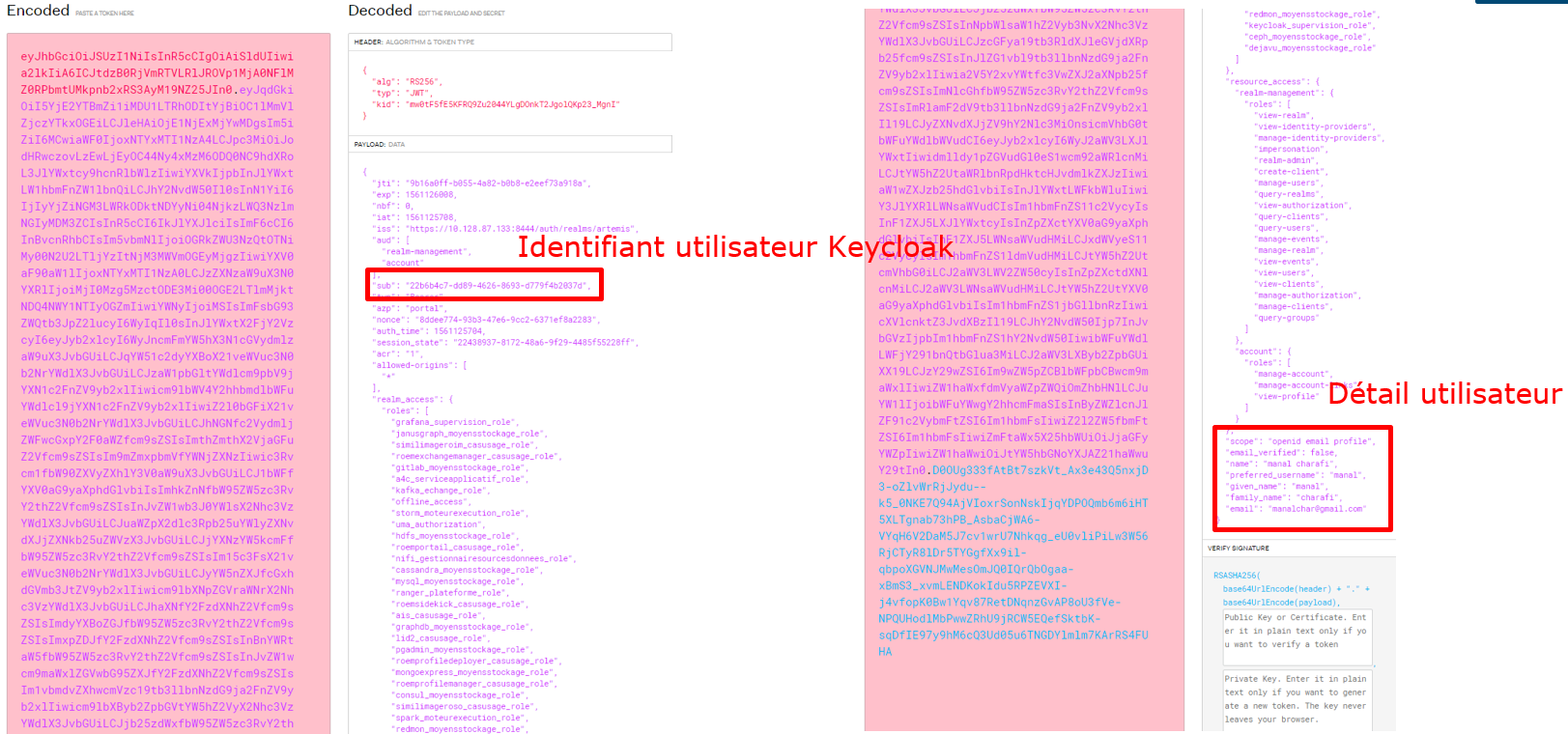
Reminder about the JWT token: here
Token Format
| Token | Meaning |
|---|---|
 | jti: unique identifier realm_access: ZDS realm-level permissions resource_access: Permissions at the client level (including the use case client) iss: source that generated the token sub: user's technical identifier (Keycloak) azp: client_id OIDC used to generate the token given-name: user's first name family-name: user's last name |
All fields are defined in the documentation (online): https://www.keycloak.org/docs-api/4.8/rest-api/index.html#_accesstoken
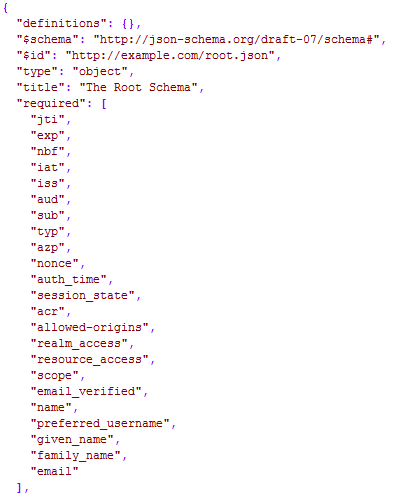
The JSON schema is available here.
Token Introspection
Introspection allows you to validate the token (i.e., session still active, token valid, token not violated, etc.). It is recommended to validate the token before each transaction (REST API call / GUI request, etc.).
To validate the token, you must use the Keycloak OIDC API: https://tools.ietf.org/html/rfc7662#section-2 (Internet access required).
Example URL:
http://keycloak-http.kosmos-iam/auth/realms/zdsX/protocol/openid-connect/token/introspect
To validate the token, you must use the target application's credentials (e.g., client_id=<client_id_application_CU>, client_secret=123) and provide the token in the request body.
Request
POST /auth/realms/zdsX/protocol/openid-connect/token/introspect HTTP/1.1
Host: <iam-endpoint>
Content-Type: application/x-www-form-urlencoded
Authorization: Basic b64(client_id:client_secret)
Cache-Control: no-cache
token=eyJhbGciOiJSUzI1NiIsInR5cCIgOiAiSldUIiwia2lkIiA6ICIwQTZrekIxeWV2Yzd\...
Response
{
#token information#
"active": true | false
}
Calling host value
Keycloak IAM is exposed to the frontends behind the Kubernetes Ingress. Calls must therefore be made to <iam-endpoint>: auth.<external_domain> (e.g., auth.mydomain.client)
Keycloak IAM is also accessible from the backend:
- from a Kubernetes cluster pod,
<iam-endpoint>:keycloak-http.kosmos-iam(via HTTP) - from a VM, i.e., outside the Kubernetes cluster,
<iam-endpoint>:auth.technique.artemis(via HTTPS)